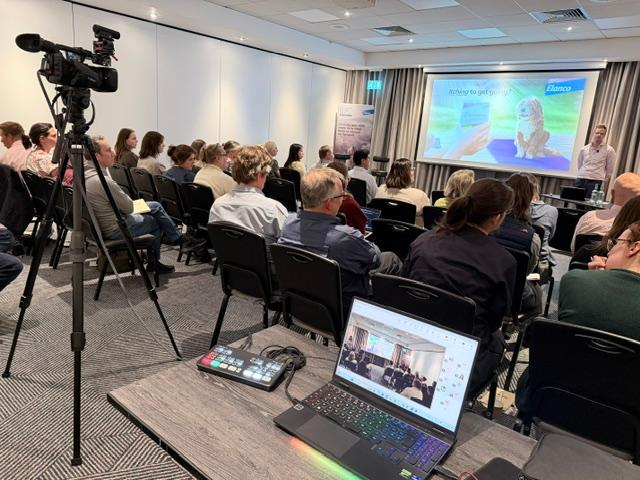
Many businesses are surprised to learn that a Teams or Zoom meeting doesn't have to rely on a webcam. We can integrate professional cinema cameras, broadcast microphones and studio lighting into your online meeting, giving remote viewers a far more polished experience.
Our Typical Setup
For most productions we use a Blackmagic ATEM Mini as the central hub.
Each camera connects to the ATEM via HDMI. This allows us to switch instantly between camera angles, whether that's a presenter, audience, demonstration table or wide shot.
The ATEM connects to our production laptop via USB, where it appears as a standard webcam. Microsoft Teams, Zoom and most webinar platforms simply recognise it as another camera, so there is no specialist software required by the client.
Live Graphics and Presentations
Our production laptop runs OBS Studio, allowing us to build a live programme before it reaches Teams or Zoom.
This means we can include:
- Company logos
- Name captions (lower thirds)
- Holding slides
- Presentation graphics
- Countdown timers
- Split-screen interviews
- Picture-in-picture layouts
- Screen shares
- Pre-recorded videos
Everything is assembled live and sent as a single high-quality video feed into the meeting.
Professional Audio
Clear sound matters just as much as the picture.
Presenters can use wireless lapel microphones, handheld microphones or a lectern microphone. Audio is mixed before entering the broadcast, ensuring remote participants hear every word clearly with minimal background noise.
Broadcast Quality Without Complication
From the client's perspective, joining the meeting is exactly the same as any normal Teams or Zoom call.
Behind the scenes, however, we're operating a compact television-style production system using professional cameras, lighting, switching and graphics.
The result is a meeting, webinar or presentation that looks considerably more professional than a standard laptop webcam while remaining simple for everyone taking part.