
If you're planning a video for your business, the first thing to decide isn't simply “What dimensions should it be?” It is:
Where do you want the finished content to be seen?
A video that works perfectly on your website may need a different shape for Instagram Reels. LinkedIn, YouTube, social feeds and website banners can all call for different versions.
That doesn't usually mean organising several separate shoots. If the project is planned with the final uses in mind, one filming day can provide a main film, vertical edits, social feed versions, shorter clips and website banner footage.
This guide explains the main formats businesses are likely to need in 2026, and how to get more value from the footage you are already commissioning.
Why the format is best decided before filming
You don't need to turn up with a technical specification sheet. The useful information for us is where the finished video will appear.
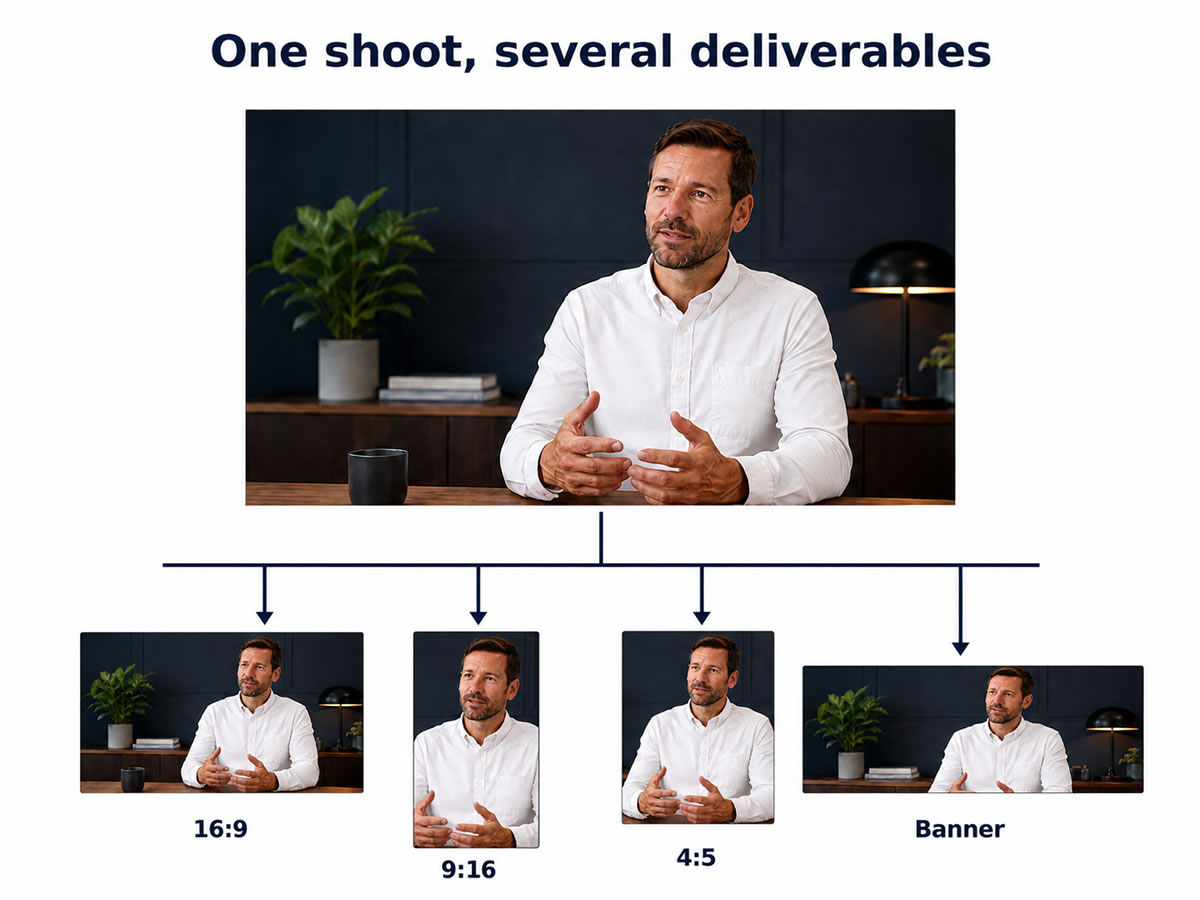
If you want a main website film as well as Reels, Stories or social advertising, we can compose the shots from the outset so they have room to work in landscape and vertical versions. That helps avoid faces, products, hands or other important details disappearing when the picture is reframed.
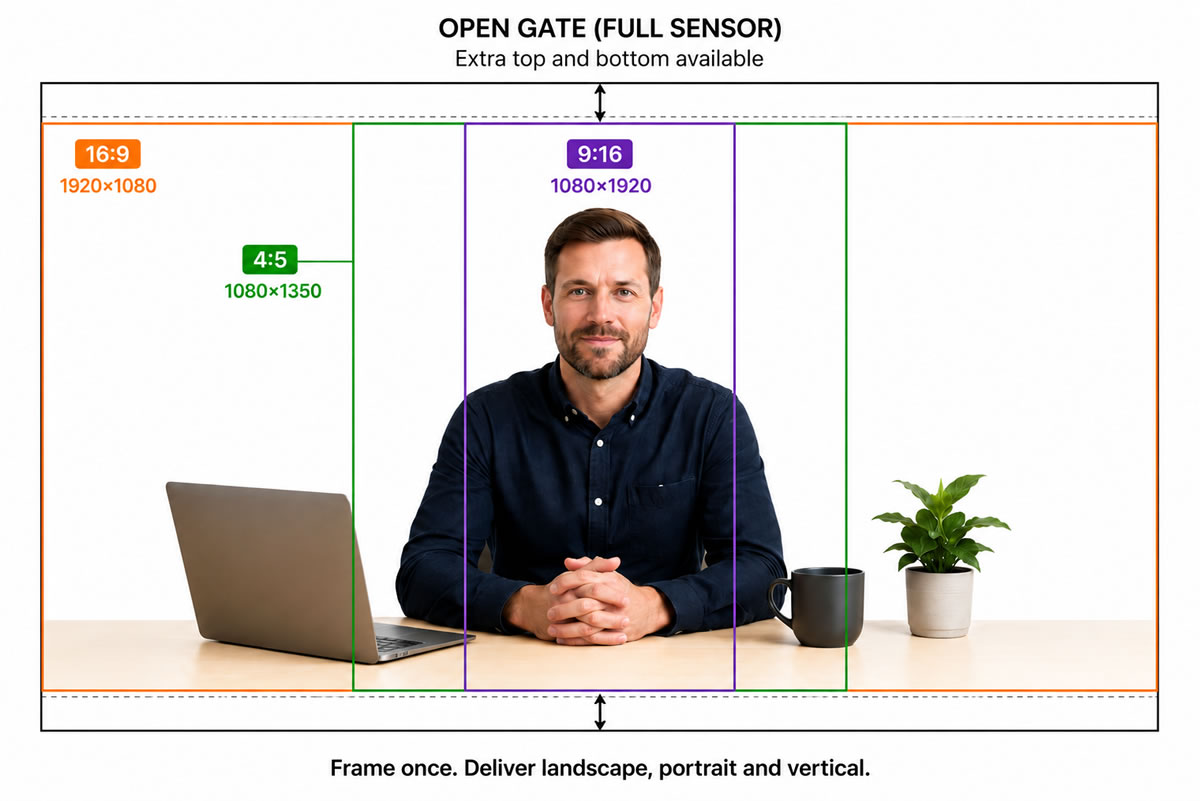
During the shoot we can use 9:16 and 4:5 framing guides while recording a wider master image. That lets us see in advance what will remain visible in the social versions.
What does “open gate” mean?
Some cameras can record a taller area of the sensor, known as open gate — a feature more videographers are now asking camera manufacturers to include because clients increasingly want the same footage to work in both landscape and vertical formats. You don't need to worry about the terminology; the practical benefit is simply that there can be more picture above and below the subject when a 9:16 or 4:5 version is created later, giving us more flexibility to adapt one shoot for different platforms without compromising the composition.
The four video shapes worth knowing
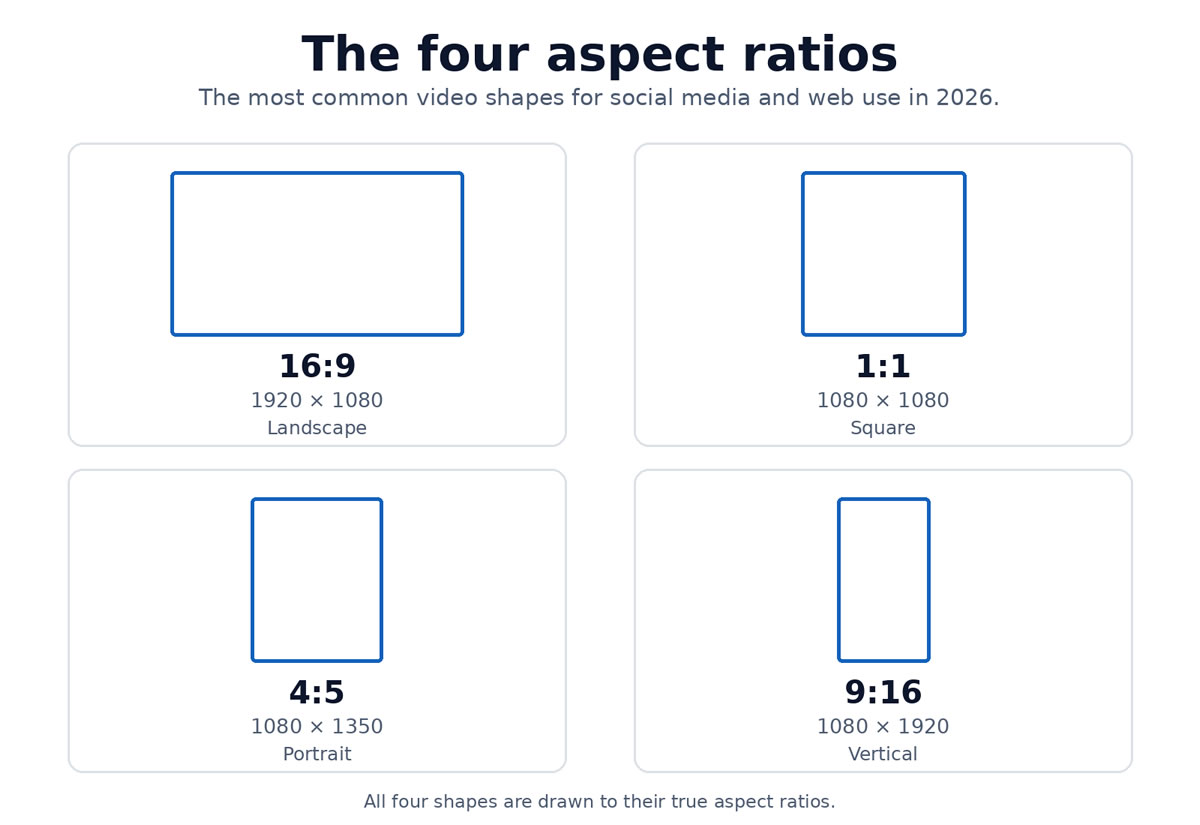
Most business video requirements now come down to four main aspect ratios.
| Format | Typical resolution | Shape | Common uses |
|---|---|---|---|
| 16:9 | 1920 × 1080 | Landscape | YouTube, websites, presentations, LinkedIn |
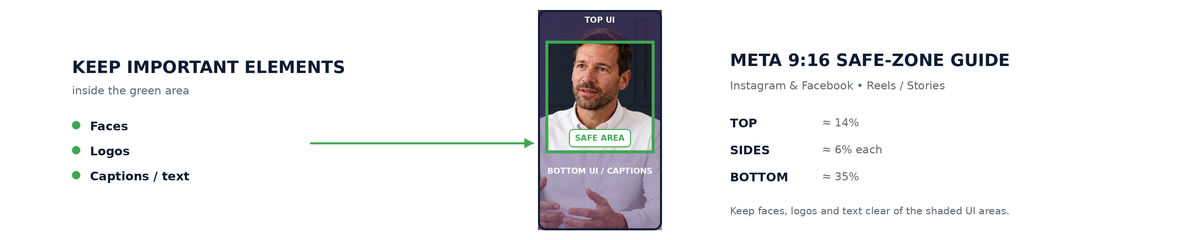
| 9:16 | 1080 × 1920 | Vertical | Instagram Reels, Facebook Reels, Stories, YouTube Shorts |
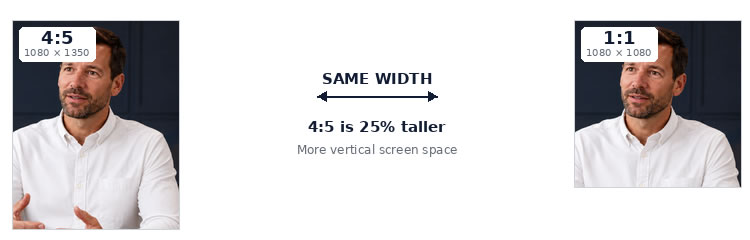
| 4:5 | 1080 × 1350 | Portrait | Instagram and Facebook feeds, LinkedIn advertising |
| 1:1 | 1080 × 1080 | Square | Social feeds and some advertising |
Most companies won't need every version. In many cases, a 16:9 main film plus a 9:16 vertical edit will cover the most useful placements. If Instagram, Facebook or LinkedIn feeds are a major part of the campaign, a 4:5 version can also be worthwhile.
The point is to choose the formats you will genuinely use rather than ordering every possible variation.
16:9 Landscape Video
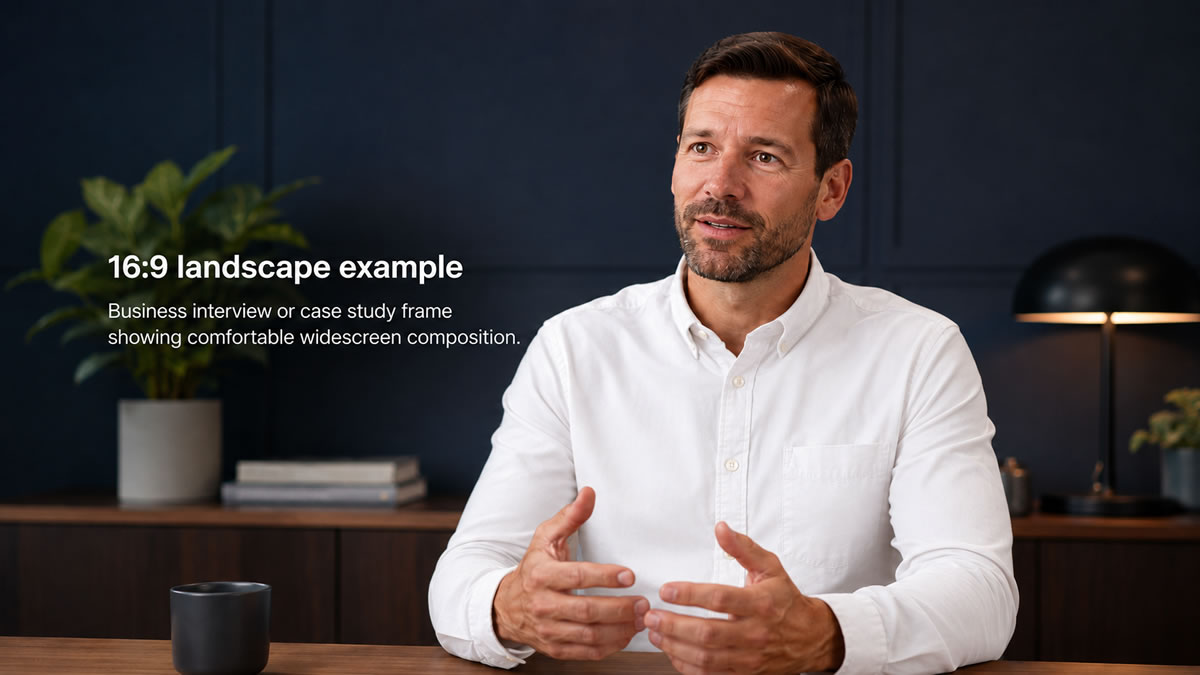
Recommended size: 1920 × 1080 pixels
This familiar widescreen shape remains the natural starting point for most business films. If you're commissioning a case study, testimonial, company film or event video, 16:9 will often be the version used in the widest range of places.
Best for:
- YouTube
- Company websites
- Case study films
- Customer testimonials
- Corporate films
- Training and induction videos
- Conference films
- Presentations
- Video embedded within web pages
For many productions, 16:9 works well as the main film, with shorter or differently shaped edits supplied alongside it for social media.
9:16 Vertical Video
Recommended size: 1080 × 1920 pixels
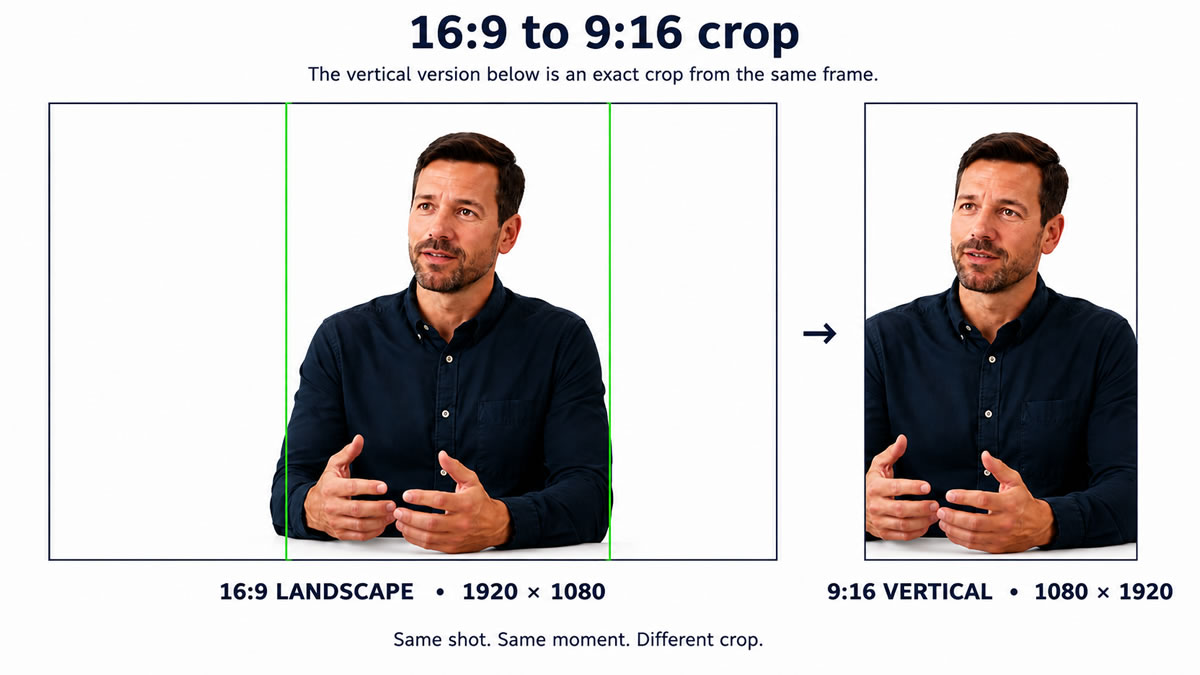
Hold your phone upright and you're looking at 9:16. It is the full-height format used by Reels, Stories and Shorts, making it one of the most useful extra deliverables when social media is important.
Best for:
- Instagram Reels
- Facebook Reels
- Instagram Stories
- Facebook Stories
- YouTube Shorts
- Vertical social advertising
The important catch
A strong vertical version isn't always made by simply cutting the sides off a landscape film. A second person, product or piece of equipment that is clearly visible in 16:9 can vanish completely in 9:16.
If vertical content is on your list, mention it before filming so the shots can be composed with both versions in mind.
4:5 Portrait Video
Recommended size: 1080 × 1350 pixels
4:5 is taller than square but not as narrow as a full-screen Reel. For businesses publishing into social feeds, it offers a useful compromise between landscape and full vertical.
Best for:
- Facebook Feed
- Instagram Feed
- LinkedIn Feed
- Social advertising
The benefit is straightforward: it takes up more of a phone screen than landscape video while still sitting naturally within a scrolling feed.
If paid social or feed-based content matters to the campaign, a 4:5 edit can be a useful addition to the final delivery.
1:1 Square Video
Recommended size: 1080 × 1080 pixels
Square video is still accepted across the major social platforms, although it is no longer automatically the first choice for every feed.
Useful for:
- Facebook feeds
- Instagram feeds
- Certain adverts
- Content that needs to work consistently across several feeds
If you want to make better use of a phone screen, 4:5 will often be the more effective feed format. Square remains handy when one simple social version needs to work across several placements.
Instagram Video Sizes in 2026
If Instagram is central to your campaign, there are two formats most businesses should think about first.
Instagram Reels and Stories
1080 × 1920 — 9:16 vertical
This is Instagram's full-screen mobile format. Faces, logos, captions and product details should stay away from the extreme edges because interface elements can cover parts of the picture.
Instagram Feed
1080 × 1350 — 4:5
Instagram accepts several aspect ratios, but simply uploading successfully isn't the same as using the screen well.
If you want Reels and feed content from the same shoot, include both in the brief from the beginning so the footage can be framed accordingly.
Facebook Video Sizes in 2026
Facebook has a number of placements, but most business projects can be reduced to a few useful formats:
Facebook Feed
1080 × 1350 — 4:5
Facebook Reels
1080 × 1920 — 9:16
Facebook Stories
1080 × 1920 — 9:16
Conventional embedded or landscape video
1920 × 1080 — 16:9
You won't usually need a different filming day for each one. Decide which Facebook placements matter to the campaign and the relevant versions can be created from the same project.
LinkedIn Video Sizes in 2026
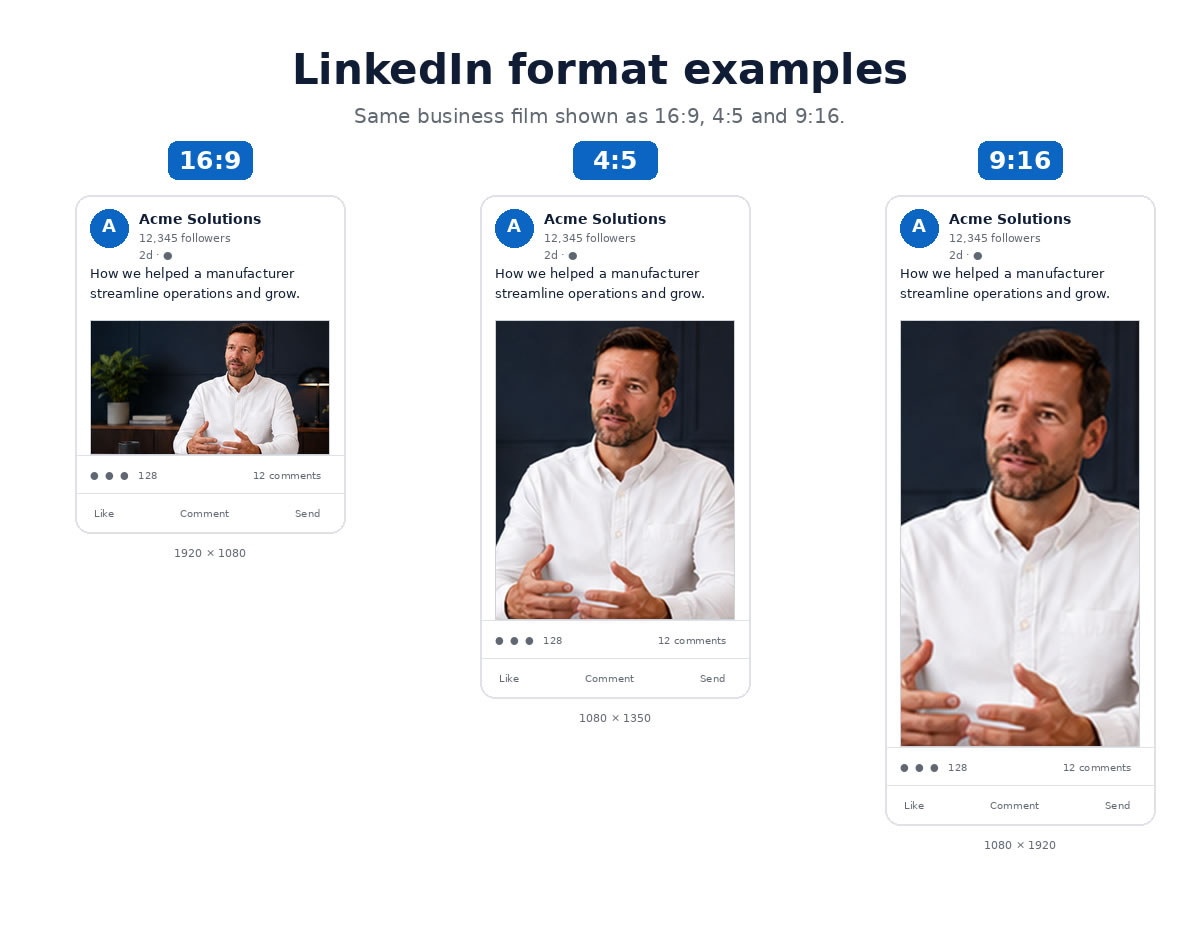
LinkedIn is more flexible than many businesses expect. Landscape, portrait and vertical formats can all work, depending on how the content will be used.
Standard LinkedIn company video
1920 × 1080 — 16:9
Well suited to case studies, testimonials, interviews, company news, recruitment films, project videos and event films.
Mobile-focused LinkedIn content
1080 × 1350 — 4:5
A useful choice when the main audience will encounter the video while scrolling through the LinkedIn feed.
Short vertical content
1080 × 1920 — 9:16
If you're already producing vertical edits for Reels or Shorts, properly framed material can also provide useful LinkedIn content without another filming day.
YouTube Video Sizes in 2026
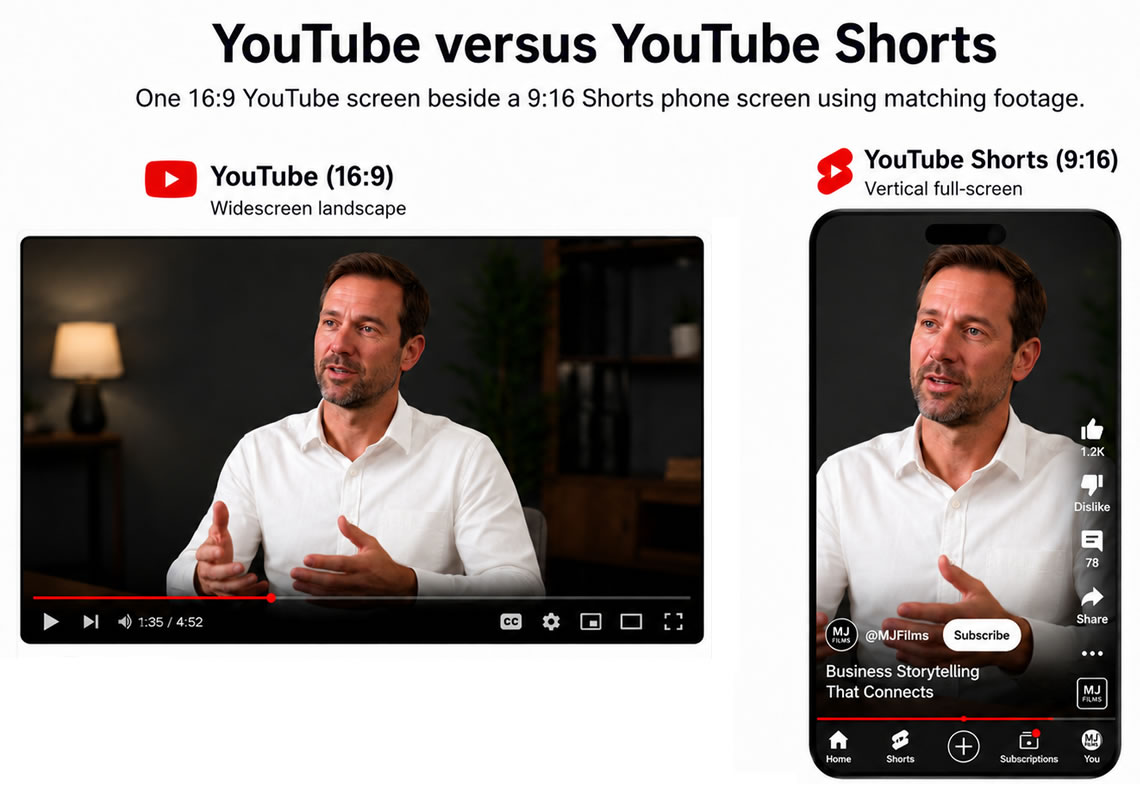
YouTube gives businesses two quite different ways to use footage from the same production.
Standard YouTube videos
1920 × 1080 — 16:9
This is the obvious format for a main company film, testimonial, case study, product demonstration, interview, training video or event film.
YouTube Shorts
1080 × 1920 — 9:16
A longer production can also generate shorter vertical content. A three-minute customer case study, for example, might provide a 30-second customer quote, a 20-second product clip, a short behind-the-scenes piece and a vertical project highlight.
They don't need to be treated as separate productions. They can be included as additional deliverables from the same shoot.
What About Website Banner Videos?
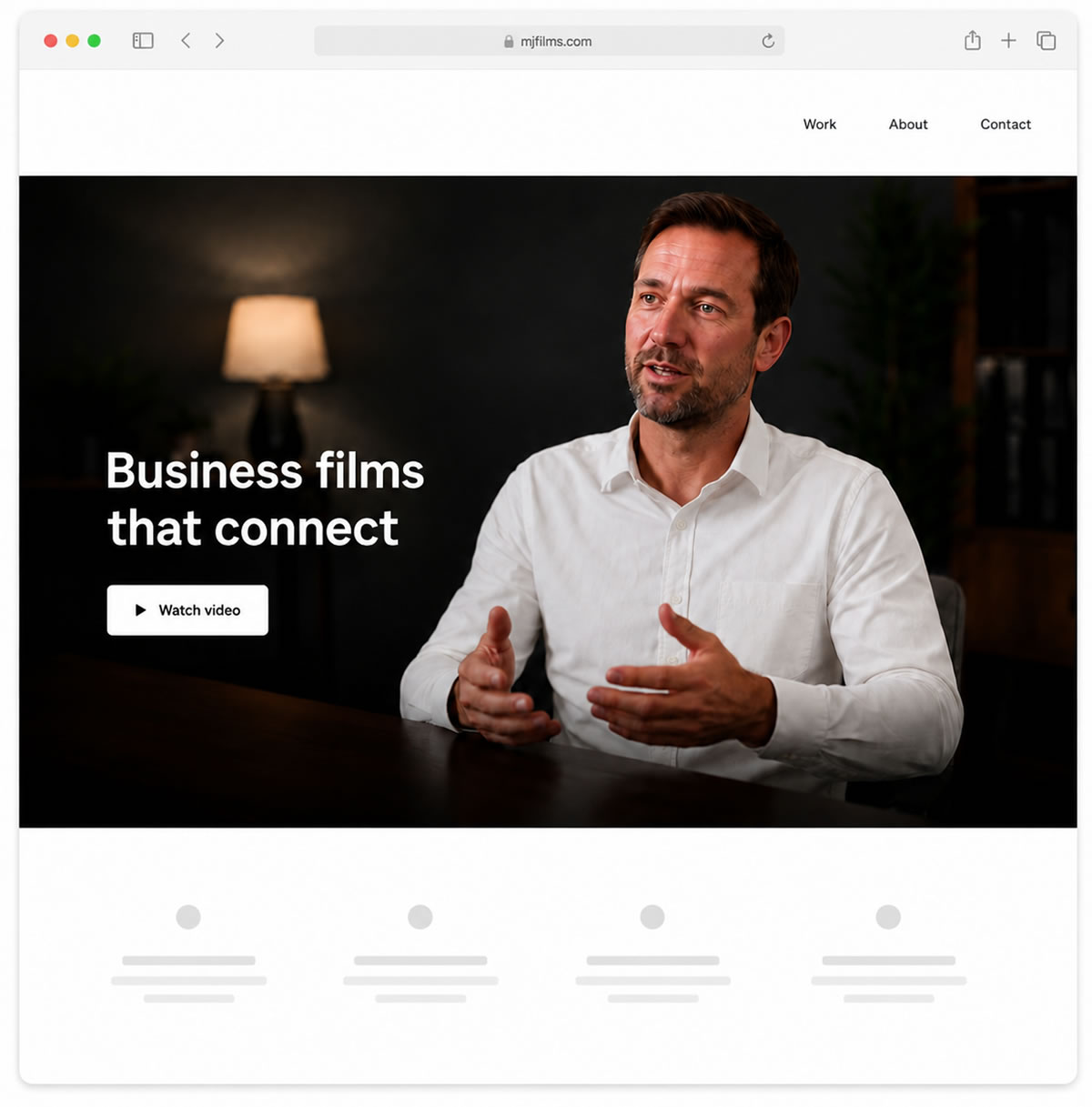
Website banner videos — sometimes called hero videos or background videos — behave differently from a normal video player. They often sit behind a headline or call to action and can be cropped differently depending on the screen.
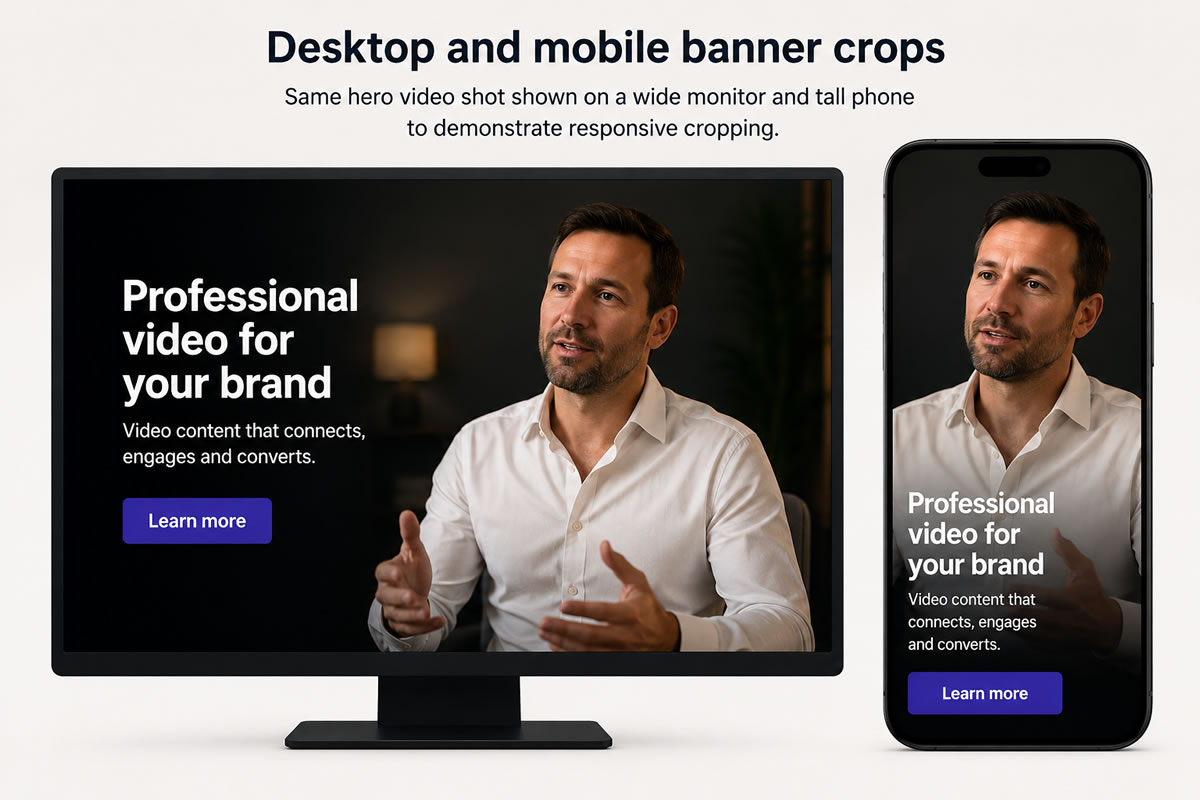
There is no single universal banner dimension. A wide desktop monitor might show a broad section of the image while a phone can reveal a much tighter crop.
A good starting point
1920 × 1080 — 16:9
The main consideration is where the important action is positioned within the frame. Put a person, product or other key detail too close to an edge and it may disappear as the website adapts to different displays.
Banner footage is therefore usually composed with the most important visual information kept in a safer central area.
Website banner videos should also be short
A homepage banner generally works better with short visual moments than a complete company film: people working, machinery in use, product details, customer interaction, locations, movement through a building or short drone shots.
These clips often work without dialogue because banner video commonly autoplays silently. The full film can sit elsewhere on the page with sound and playback controls.
Don't Forget Mobile Website Banners
A wide desktop banner may look very different when somebody opens the same website on a phone.
Your web developer might crop the same footage automatically, or you can request a dedicated mobile version when the composition needs more control.
If video is a key part of the first impression your website gives, providing both versions can help make sure visitors see the intended subject on desktop and mobile.
Desktop: 16:9 or wider composition
Mobile: 9:16 vertical composition
It is another good reason to decide how the footage will be used before the shoot starts.
Should Text Be Added to the Video?
Sometimes, although permanent text inside the picture isn't always the best option.
Your website may already place its own headline over a banner video, while social platforms can add captions, usernames, buttons and descriptions over the frame.
If text needs to be part of the video itself, it should remain inside a sensible safe area so it stays readable and isn't covered by interface elements. This matters particularly with 9:16 video.
Should Videos Have Captions?
For interviews, testimonials and spoken social content: usually, yes.
A lot of social video is first seen without sound. Captions also improve accessibility and make spoken information easier to follow in busy environments.
Depending on how the video will be published, you can ask for a clean version, a captioned version, or both. A clean master remains useful when the website or platform will provide its own captions.
Do I Need Four Completely Different Videos?
Usually not. Planning the deliverables in advance can turn one production into several useful pieces of content.
For example, one customer case study shoot could provide:
Main film
16:9 — 1920 × 1080
For your website, YouTube and LinkedIn.
Vertical social edit
9:16 — 1080 × 1920
For Instagram Reels, Facebook Reels, Stories and YouTube Shorts.
Feed version
4:5 — 1080 × 1350
For Instagram, Facebook and LinkedIn feeds.
Website banner
A short, dialogue-free selection of shots prepared for your homepage.
Rather than commissioning four separate productions, you can come away with a set of related video assets from one project, each prepared for the platform where it will appear.
What to Tell Us Before the Shoot
You don't need to know which camera setting, lens or recording mode is required. Tell us where the finished content will be used and what you want it to achieve.
Before filming, it helps to know whether you need:
- Website video
- Website banner video
- YouTube
- Reels
- Stories
- Shorts
- Paid advertising
- Vertical edits
- Captioned versions
MJ Films can then recommend the formats that make sense for the project and plan the filming so those versions work properly.
So, What Video Sizes Should I Ask For?
For a typical business video project in 2026, this is a useful starting point:
Main video:
1920 × 1080 — 16:9
Vertical social version:
1080 × 1920 — 9:16
Social feed version if required:
1080 × 1350 — 4:5
Square version if specifically needed:
1080 × 1080 — 1:1
Website banner:
Usually based around 16:9 footage, edited specifically for the website layout.
Your project may need fewer versions, or a different mix. You don't need to decide every technical detail yourself. Tell us where the content will appear and MJ Films can recommend a practical set of deliverables before filming.
Planning a Video for Several Platforms?
MJ Films can plan a production around the places your audience will actually encounter the content — from your website and YouTube to Instagram, Facebook and LinkedIn.
A single project can include a main landscape film, vertical social edits, shorter clips, captioned versions and footage prepared for website banners, rather than treating every format as a separate production.
Tell us what you're producing, who you want to reach and where the video will be published. We'll recommend the versions that make sense and plan them into the filming from the start.
Contact MJ Films to discuss your project.